 icon to the right of the fund to reveal the percent or amount field that is used to designate the amount of money invested into the fund. Additional funds can also be added if the Choose a Fund drop down box is available.
Oracle® Insurance Policy Administration 9.6.0.0 E35883-01
OIPA functionality supports allocations that display fund models, which can be selected instead of a particular fund when money is invested into a policy. Allocations that use models will only be available if the configuration is available to support that method.
When a Variable Annuity policy is open, click the Allocation link in the Left Navigation menu to see the preconfigured allocation options available. When an allocation option such as Future Allocations is clicked, the Allocation screen displays the funds or fund models that are available to the client.
When an allocation is open, the Allocation screen displays the investment choices available to a client.
If funds are available then a Fund section will provide a drop down list of all funds available to the client. Click the green plus icon to the right of the fund to reveal the percent or amount field that is used to designate the amount of money invested into the fund. Additional funds can also be added if the Choose a Fund drop down box is available.
If models are available then a Models section will provide a drop down list of all models available to the client. Click the green plus icon to the right of the model to reveal the percent or amount field that is used to designate the amount of money invested into the model. Additional models can also be added if the Choose a Model drop down box is available.
When a model is selected and the green plus icon is clicked, the model details will be listed at the bottom of the screen. Each model that is added is listed directly below the previous model. Some models will have the percent/amount field locked down, indicating that the allocations cannot be edited. Other models will have percent/amount fields that are enabled, allowing a user to choose the investment percents for each investment option in the model.
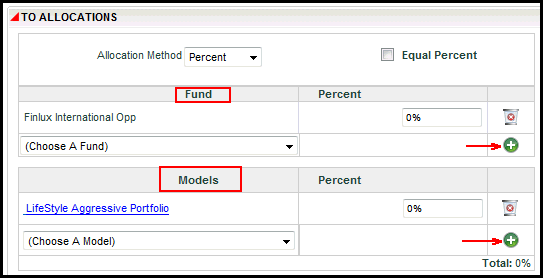
Model and Fund Options in OIPA
Copyright © 2009, 2013, Oracle and/or its affiliates. All rights reserved. Legal Notices